Basic Game Feedbacks
Updated: Dec 31, 2024
OVERVIEW
Game feedback is a form of communication, usually used for conveying game features, expressing the state of the game or validating player's action. It can make or break the game experience, and it is an integral part of game design. There are times when we have to examine the design separately and in such cases, we can temporarily isolate the game feedback, as long as it is not neglected afterwards. Game design and game feedback are not the same thing, but they are not mutually exclusive to each other. It is a good practice to iterate game design and game feedback together.
Here's a list of basic game feedbacks that I usually consider when it comes to convey a game feature.
Shape
Texture
Animation
Visual Effect
User Interface
Controller
Lighting
Camera
Sound Effect
Music
SHAPE
Consider resizing the shape, deform the shape or replace it with an entirely new shape. This applies to any objects, including the characters.
Example from Dota 2

The bigger he is, the stronger he gets, but at the cost of attack speed.
Players can easily guess that this hero will deal more damage as he grows bigger, but with reduced attack speed. The developer didn't just scale him up, each phase comes with more silhouette details.
Example from Resident Evil 8 : Village

Left : Head intact | Right : Head exploded
What better way to reaffirm a successful headshot?
TEXTURE
Consider adding, reducing or changing the texture.
Example from Death Stranding

Left : New vehicle | Right : Old vehicle
These are essentially the same type of vehicle. One is still in good condition and the other is in bad condition. They use different texture for both the body and the tires to indicate its condition.
Example from Hellblade : Senua's Sacrifice

Left : Rot below elbow | Right : Rot reaches elbow
This is probably one of the most unique feature in gaming history. The rot increases each time you die and most players are being extra cautious throughout the game for the fear of permanent death. For this feature, the developer wanted the players to feel what Senua felt, worrying about things that doesn't really exist.
ANIMATION
Consider adding or changing the animation. Ideally with transitions that matches your game's levels of details.
Example from Dota 2
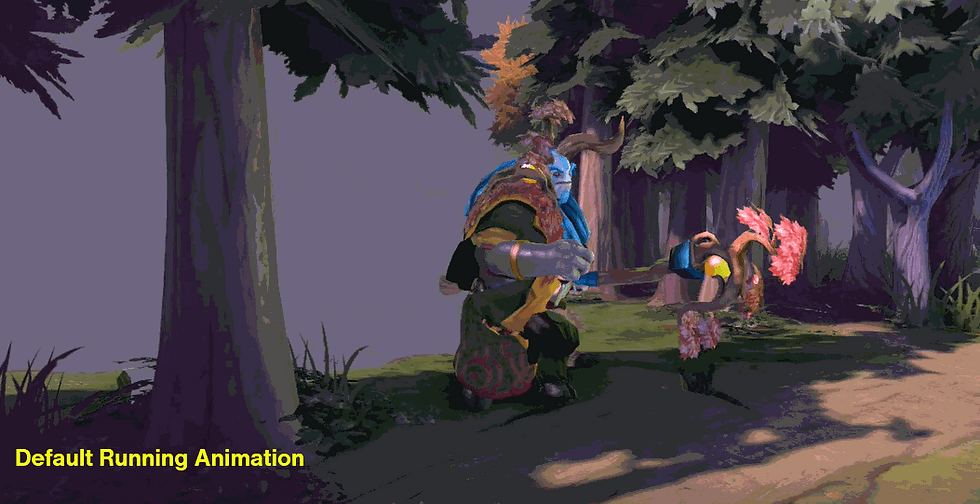
Nature Prophet run in default cycle and injured cycle.
This is a good animation feedback not only because it helps player to notice their character is in critical health, it also give other players an additional cue to read when they are trying to look for the enemy with critical health, especially when the health bar are not readable ( usually when there are too much visual effects going on during war ).
Example from Death Stranding

Weight balancing.
Player can tell if Sam is about to lose his balance by just reading his animation. He also have clear animation feedback when balancing his weight ( look at his hands, he grabs the cargo straps at the front ).
VISUAL EFFECT
Consider adding or modifying visual effect. Figure out if the effect is going to be a quick burst or played continuously.
Example from Death Stranding

Sam repairing cargo.
These visual effects are not just purely aesthetic, each has their own functions. Gas coming out of the spray can confirms player's action and also indicates the spray can is not empty. Only cargos that are not in perfect condition, and affected by the gas will glow.
Example from Marvel's Spider-Man ( 2018 )

Spidey sense tingling!
Whenever Spider-Man is about to get hit, his spider sense tingles. This visual cue is both functional and stays true to the narrative.
USER INTERFACE
Consideration of UI manipulation includes HUD, text and other on-screen effects. You can also consider diegetic UI and spatial UI.
Example from Hollow Knight

Standard HUD
In Hollow Knight, every action that consumes any resources will have proper feedback from the HUD. It is usually done with clarity while maintaining its aesthetic continuity.
Example from Death Stranding

Use of Spatial UI
Whenever Sam is within range, Spatial UI will be visible on cargos to indicate its location, type of cargo and the size of the cargo. It's a very efficient way to inform players of the cargo's details and adjust their plan accordingly.
CONTROLLER
Consider adding control rumble to enhance the overall conveyance. Pay attention to the use of each motors, rumble intensity and rumble duration.
I remembered playing a VR game demo about archery. The developer added rumble feedback whenever the bow's string is pulled at maximum range. This is a clever technique to compensate for the lack of actual bow with string.
In Death Stranding, they include control rumble feedback for almost everything in the gameplay and cinematic. They do so to stimulate human's basic sense ( touch ) and enhance the overall experience. Although they use it for almost everything, it is done with enough fidelity and just the right amount of subtlety.
The last thing that you want to have is to make the controller goes BBRRrrrrrrrrrrrrrrrrr!!!! the entire game.
LIGHTING
Consider adding, modifying or removing lighting. Explore the types of lighting, colour and intensity.
Example from Horizon Zero Dawn

From the left : blue light ( chilling ), yellow light ( suspicious ), red light ( aggressive )
In Horizon Zero Dawn, the colour of the light ( the eye ) indicates the state of the robots. You can also clearly tell which direction they are looking at ( thanks to the light of their eye ), it is a useful information to have when you need to sneak around these robots.
Example from Resident Evil 8 : Village

Progression 1 : Lighting is relatively bright
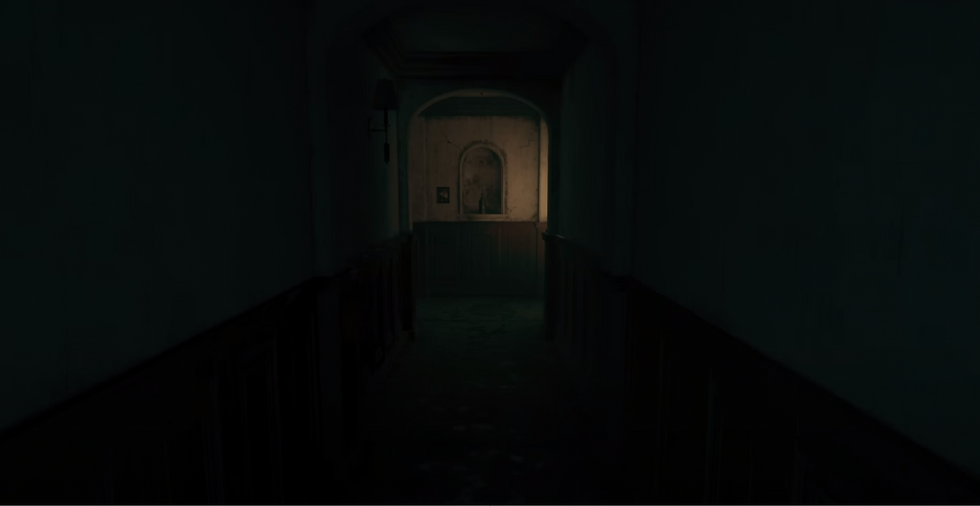
Progression 2 : Most lighting are out, with only a few lights remaining

Progression 3 : Completely dark, only rely on torch light
These screenshots are from the Donna Beneviento chapter in Resident Evil 8 : Village. The changes of lighting is not just for the sake of aesthetic, it also indicates that player is progressing in this level.
CAMERA
Consider adding or modifying camera movement. Camera shake is everyone's favourite, but let's not spam camera shake everywhere.
Example from Little Nightmares

Camera swaying the entire game.
You'll notice there's this constant yet subtle camera swaying throughout the entire game. It's a clever way to hint at players on where this place might be. You'll probably experience a similar swaying motion while sailing, depending on the size of the ship and the wave.
Example from Assassins' Creed : Valhalla

Camera swaying for drunk feature.
Camera swaying fits very well with the overall effect when Eivor is drunk. It is also an accurate depiction of what you might feel when you're drunk.
SOUND EFFECT
Consider adding sound effect to enhance the overall conveyance. You can also consider removing or reducing the sound effect.
Example from Dota 2
His ultimate skill prevents other players from casting spells.
The sound effect reaffirm players that the skill is successfully triggered, and let other players know why they couldn't cast spell at the moment. It also helps the players to estimate the duration.
Example from Death Stranding
Sensor is triggered whenever player is nearby.
There's a bit of buffer time before the signal reaches back to you, the players can also just estimate how much time do they have by just listening to the sensor's sound.
MUSIC
Consider adding, changing or stopping the music. It works best with dynamic response within the game. Play around with layers of music.
Example from Resident Evil 8
Music cues in three different states.
There are 3 different states during the encounter of Lady Dimitrescu in the mansion, and they used 3 distinctive music cues for each state. The music cues are functional and aesthetically pleasing.
Example from Resident Evil 8
A different scenario of exiting the pursuing range.
This is a scenario when Lady Dimitrescu is the one that exit the pursuing range, instead of the player.
Example from Dota 2
Her ultimate skill causes all enemies within a range to freeze for a given duration.
Vocal music is used to reaffirm players that her ultimate skill is successfully triggered, and let other players know why they cannot move at the moment. It also helps the players to estimate the duration.
CONCLUSION
These are not rules that you must follow, it is meant to make you think more about communicating your game features to the players.
Download the slides here.
Comments